Your smartwatch is an indispensable companion, constantly tracking your fitness, delivering notifications, and keeping you connected. Yet, a crucial component often overlooked in its maintenance is the charging pins. These small, often metallic contacts are the lifeline of your device, enabling it to recharge and sync vital data. Neglecting them can lead to a host of frustrating issues, from sluggish charging to complete device failure. Understanding why and how to keep these pins pristine is key to ensuring your smartwatch remains a reliable part of your daily life.
The Unseen Obstacle: Why Smartwatch Charging Pin Cleanliness is Crucial
The tiny charging pins on your smartwatch are constantly exposed to various elements, creating an environment ripe for debris accumulation and corrosion. A seemingly minor issue like dirty pins can escalate into significant problems, impacting your device’s performance, longevity, and even your user experience.
Impaired Charging Efficiency
One of the most immediate and noticeable effects of dirty charging pins is a decline in charging efficiency. When grime, sweat, or dust builds up on these contacts, it creates a barrier that hinders the flow of electricity. This can manifest as:
- Slow or Intermittent Charging: Your smartwatch might take significantly longer to charge, or it may repeatedly connect and disconnect from the charger, signaling an unreliable connection. This constant interruption means your device spends more time tethered to a power source, reducing its availability.
- Complete Charging Failure: In severe cases, the accumulation of debris can completely block the electrical contact, preventing your smartwatch from charging altogether. You might wake up to a dead device, rendering it useless until the connection issue is resolved.
- Impact on Battery Health and Longevity: Inefficient charging can put undue stress on your smartwatch’s battery. When the device struggles to achieve a full charge, or experiences frequent disconnections, the battery’s overall health can degrade faster, leading to a shorter lifespan and reduced capacity over time.
|
Our Picks for the Best Smartwatch in 2026
As an Amazon Associate I earn from qualifying purchases.
|
||
| Num | Product | Action |
|---|---|---|
| 1 | Apple Watch Series 11 [GPS 46mm] Smartwatch with Jet Black Aluminum Case with Sport Band - M/L. Sleep Score, Fitness Tracker, Health Monitoring, Always-On Display, Water Resistant |
![Check Apple Watch Series 11 [GPS 46mm] Smartwatch with Jet Black Aluminum Case with Sport Band - M/L. Sleep Score, Fitness Tracker, Health Monitoring, Always-On Display, Water Resistant on Amazon](https://smartwatchus.com/wp-content/plugins/amazon-tables/assets/images/buy.png)
|
| 2 | WHOOP 5.0/MG Activity Tracker - 12 Month Membership - Health and Fitness Wearable – 24/7 Activity and Sleep Tracker, Personalized Coaching, Menstrual Cycle Insights – 14+ Days Battery Life |
|
| 3 | Smart Watch for Men, 120+ Sports Modes Smartwatch with 1.83" HD Touchsreen, Sleep Monitor, IP67 Waterproof, Bluetooth Call & Music Control Fitness Watch for iPhone/Android Black |
|
| 4 | SAMSUNG Galaxy Watch 7 40mm Bluetooth AI Smartwatch w/Energy Score, Wellness Tips, Heart Rate Tracking, Sleep Monitor, Fitness Tracker, 2024, Cream [US Version, 1Yr Manufacturer Warranty] |
|
| 5 | Smart Watch with Alexa Built-in, 1.83" HD Touchscreen Fitness Tracker with Bluetooth Calling, Fitness Watch with Heart Rate/Sleep Monitor, 120+ Sports Modes, IP68 Waterproof Smartwatch for Android iOS |
|
| 6 | Apple Watch Series 11 [GPS 42mm] Smartwatch with Rose Gold Aluminum Case with Light Blush Sport Band - S/M. Sleep Score, Fitness Tracker, Health Monitoring, Always-On Display, Water Resistant |
|
| 7 | Smart Watch for Men Women Compatible with iPhone Samsung Android Phone 1.83 inch Full Touch Screen IP68 Waterproof Bluetooh Fitness Tracker Heart Rate/Sleep Monitor, Black |
|
| 8 | Smart Watch for Men, 120 Sports Modes Smartwatch with 1.83" HD Touchsreen, IP67 Waterproof, Sleep Monitor, Bluetooth Call & Music Control Fitness Watch for Android/iPhone (Black) |
|
| 9 | Amazfit Bip 6 Smart Watch 46mm, 14 Day Battery, 1.97" AMOLED Display, GPS & Free Maps, AI, Bluetooth Call & Text, Health, Fitness & Sleep Tracker, 140+ Workout Modes, 5 ATM Water-Resistance, Black |
|
| 10 | Smart Watch, 2026 AMOLED 1.43" Fitness Smartwatch for Men Women, Bluetooth 5.4 Call, 130+Sports Modes, 60+Days Flashlight, Heart Rate/Sleep Monitor, IP68 Waterproof Activity Tracker for Android iOS |
|
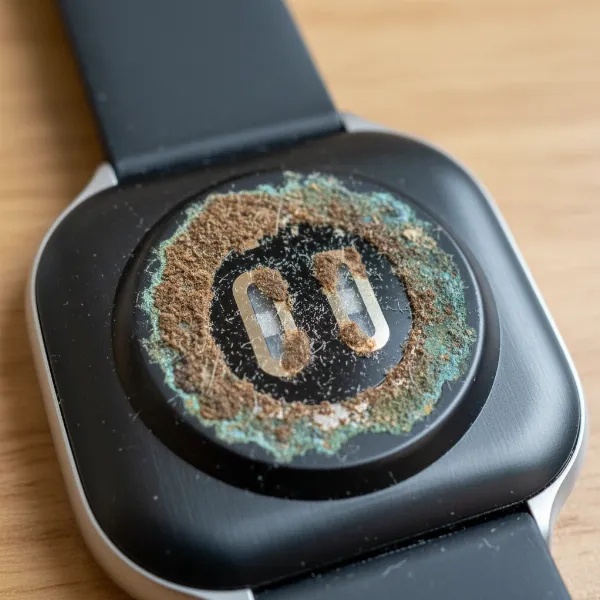 Close-up of dirty smartwatch charging pins showing grime and corrosion affecting connectivity.
Hindered Data Transfer
Beyond powering your device, charging pins often facilitate data transfer between your smartwatch and its charging dock, and subsequently, to your smartphone or computer. A compromised connection due to dirty pins can lead to:
- Syncing Failures with Companion Apps: Your activity data, heart rate readings, sleep patterns, and notifications rely on seamless data transfer. Dirty pins can interrupt this process, causing incomplete data synchronization or preventing your smartwatch from connecting with its companion app entirely, leaving you with outdated or missing information.
- Firmware Update Complications: Smartwatch manufacturers regularly release firmware updates to introduce new features, improve performance, and fix bugs. These updates often require a stable connection, typically through the charging pins. A faulty connection can prevent successful updates, leaving your device vulnerable or unable to access the latest enhancements.
Risk of Device Damage and Corrosion
Perhaps the most severe consequence of neglecting charging pin cleanliness is the potential for permanent damage to your smartwatch. The materials making up these pins, often copper-based with gold plating, are susceptible to environmental factors.
- Oxidation from Sweat and Grime: Your smartwatch is a daily wear item, exposed to sweat, skin oils, and environmental moisture. These elements, especially when combined with dust and dirt, can lead to oxidation. This chemical reaction forms a layer of corrosion on the pins, often appearing as a dark or greenish residue. This corrosive layer not only impedes conductivity but can also erode the metal plating, eventually reaching the underlying copper.
- Short Circuits and Overheating: A buildup of conductive materials or corrosion can sometimes lead to short circuits within the charging mechanism. This can cause the watch or charger to overheat, posing a safety risk and potentially causing irreversible internal damage to the device’s sensitive electronics.
- Costly Repairs or Premature Device Replacement: Once corrosion sets in and damages the physical pins or the underlying circuit board, the only solution might be professional repair or, in severe cases, outright replacement of the smartwatch. Regular cleaning is a simple, proactive measure that can save you significant repair costs or the expense of buying a new device prematurely.
- Skin Irritation from Build-up: While not directly related to the charging pins themselves, the accumulation of gunk, sweat, and other residues around the back of your smartwatch, including the charging pin area, can lead to skin irritation, rashes, or discomfort, especially if you have sensitive skin.
Common Culprits: What Makes Charging Pins Dirty?
Understanding the primary sources of contamination can help you implement effective preventative measures. The nature of how smartwatches are worn and used makes them particularly prone to accumulating grime on their charging pins.
Everyday Exposure
Your smartwatch lives on your wrist, enduring constant interaction with both your body and the environment.
- Sweat, Skin Oils, and Dead Skin Cells: As you wear your smartwatch, especially during workouts or in warm weather, sweat and natural skin oils accumulate on its surface, including the tiny crevices around the charging pins. These bodily fluids, combined with shed dead skin cells, create a sticky residue that can easily trap other particles.
- Dust, Lint, and Pocket Fluff: Smartwatches often spend time in pockets, bags, or on bedside tables, where they are exposed to dust, lint from clothing, and other microscopic debris. These particles are adept at finding their way into small openings and adhering to sticky surfaces, building up over time.
- Environmental Elements: Depending on your lifestyle, your smartwatch might encounter more aggressive environmental factors. Sand from a beach trip, dirt from gardening, or even higher humidity can contribute to the degradation and contamination of the charging pins.
Neglect and Improper Care
While everyday exposure is unavoidable, a lack of proper maintenance significantly exacerbates the problem.
- Infrequent Cleaning Routines: Many users clean their smartwatch screen or band, but often overlook the critical charging contacts. Without a regular cleaning routine, the minor daily accumulation quickly turns into stubborn, caked-on grime that is much harder to remove.
- Residue from Lotions or Sprays: Lotions, sunscreens, insect repellents, and perfumes used on the wrist can easily transfer to the smartwatch’s surface and seep into the charging pin area. These substances can leave behind sticky or oily residues that attract dirt and further complicate electrical conductivity.
Your Guide to Safely Cleaning Smartwatch Charging Pins
Cleaning your smartwatch charging pins doesn’t require specialized skills or expensive tools. With a few common household items and a gentle approach, you can maintain optimal charging performance and prolong your device’s life.
Essential Cleaning Supplies
Before you begin, gather these items to ensure a safe and effective cleaning process:
- High-Purity Isopropyl Alcohol (70-99%): This is the gold standard for cleaning electronics because it effectively dissolves oils and grime and evaporates quickly, leaving no residue. Higher percentages are generally better as they contain less water.
- Soft-Bristled Brush: A brand-new, soft-bristled toothbrush or a small, soft detailing brush is ideal for dislodging loose debris without scratching.
- Cotton Swabs or Pointed Cotton Buds: These are perfect for applying alcohol and getting into tight spaces around the pins. Pointed versions can be particularly useful for precision.
- Lint-Free Microfiber Cloth: Essential for wiping down the device and ensuring it’s completely dry without leaving behind any fibers.
- Toothpick (for stubborn debris, use with extreme care): For very stubborn, caked-on grime, a wooden or plastic toothpick can be used to gently scrape away buildup. Exercise extreme caution to avoid scratching or bending the pins.
Step-by-Step Cleaning Process
Follow these steps carefully to clean your smartwatch charging pins:
- Powering Down Your Smartwatch: Before attempting any cleaning, always power off your smartwatch completely. This prevents accidental inputs and protects the device from potential damage during the process. Also, unplug the charging cable from its power source.
- Gently Brushing Away Loose Debris: Using your soft-bristled brush, lightly brush over the charging pins and the surrounding area. The goal here is to remove any loose dust, lint, or superficial dirt. Be gentle; you don’t want to push debris further into the contacts.
- Applying Isopropyl Alcohol with a Cotton Swab: Dampen a cotton swab with isopropyl alcohol. It should be moist, not dripping wet. Gently rub the cotton swab over each charging pin and the contact area. The alcohol will help dissolve oils, sweat residue, and light corrosion. For harder-to-reach areas, you can carefully use a pointed cotton bud. If there’s stubborn, caked-on grime, you can very carefully use a toothpick to gently dislodge it, followed by another pass with an alcohol-dampened cotton swab. Remember, light pressure is key.
- Drying Thoroughly and Completely: After cleaning with alcohol, use a clean, dry section of the microfiber cloth or a fresh cotton swab to gently wipe away any excess alcohol and dissolved residue. More importantly, allow the smartwatch and its charging pins to air dry completely. Isopropyl alcohol evaporates quickly, but ensure all moisture is gone before attempting to charge your device. This usually takes just a few minutes.
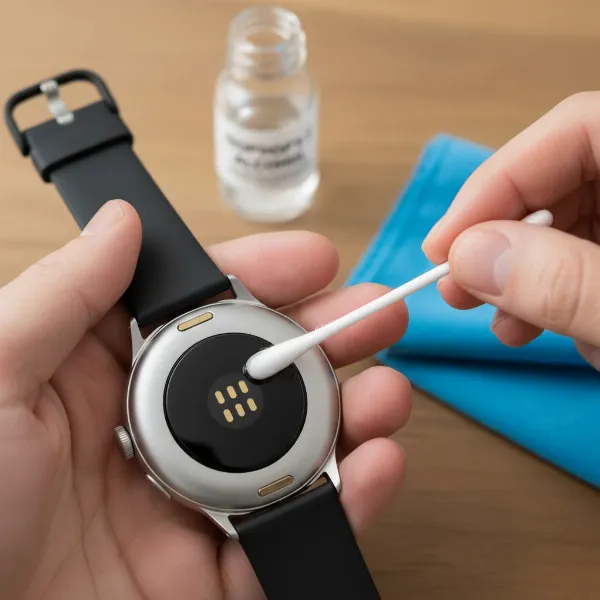 Hand using a cotton swab with isopropyl alcohol to gently clean smartwatch charging pins.
Critical Cleaning Don’ts
To prevent damage to your valuable smartwatch, be aware of what not to do during the cleaning process:
- Never use metal objects or sharp tools: Objects like staples, paper clips, or knives can easily scratch, bend, or permanently damage the delicate charging pins or their protective plating, leading to irreparable harm.
- Avoid abrasive materials and harsh chemicals: Scouring pads, steel wool, or strong cleaning agents like bleach, window cleaner, or abrasive detergents can strip coatings, corrode materials, or damage the device’s waterproofing seals. Stick to isopropyl alcohol for electronics.
- Do not submerge your watch in water or cleaning solutions: Even if your smartwatch is water-resistant, intentional submersion in cleaning solutions can force liquids into seals or damage internal components. Always clean external surfaces and use minimal moisture.
The Long-Term Benefits of a Clean Connection
Adopting a routine of regular cleaning for your smartwatch charging pins extends beyond simply ensuring a successful charge. It’s an investment in your device’s health and your overall user experience.
Prolonging Your Smartwatch’s Lifespan
Just like any piece of sophisticated electronics, proper maintenance directly contributes to longevity. By keeping charging pins clean, you are:
- Preventing Premature Wear and Tear: Eliminating corrosion and debris reduces stress on the physical contacts and internal charging components, preventing issues that could lead to early hardware failure.
- Avoiding Expensive Professional Repairs: Many charging problems that seem like hardware defects are often just due to dirty pins. A simple, regular cleaning can prevent the need for costly diagnostic services or component replacements.
Ensuring Consistent Performance
A clean connection translates directly to a smartwatch that performs as intended, day in and day out.
- Reliable and Efficient Charging: You can trust that your smartwatch will consistently charge at its optimal speed, ready for your next adventure or workday. This eliminates the frustration of a dead device when you need it most.
- Seamless Data Synchronization: All your tracked activities, health metrics, and smart notifications will sync flawlessly, ensuring you have access to accurate and up-to-date information without interruption.
Maintaining Device Value
If you ever plan to upgrade your smartwatch, keeping it in excellent condition, including its charging ports, can significantly impact its resale or trade-in value. A well-maintained device with fully functional charging capabilities is far more appealing to potential buyers.
When to Consult a Professional
While regular cleaning can solve most charging issues, there are instances where professional intervention is necessary. Knowing when to seek expert help can prevent further damage and ensure your device receives the appropriate care.
Persistent Charging Problems
If you have thoroughly cleaned your smartwatch’s charging pins and cable, and the device still refuses to charge or exhibits intermittent charging behavior, it might indicate a deeper hardware issue. This could involve internal wiring, a faulty battery, or damage to the charging port’s circuit board.
Visible Corrosion or Physical Damage
If you observe significant green or black corrosion that cannot be removed with gentle cleaning, or if the charging pins appear bent, broken, or dislodged, professional assessment is crucial. Attempting to force a charge or further manipulate damaged pins can worsen the problem.
Warranty Implications
If your smartwatch is still under warranty, contact the manufacturer or retailer before attempting any invasive cleaning or repair beyond basic external wiping. Unauthorized repairs or significant user-induced damage might void your warranty. Describe your symptoms and cleaning efforts, and they can guide you on the next steps for repair or replacement.
Frequently Asked Questions
How frequently should I clean my smartwatch charging pins?
It’s advisable to clean your smartwatch charging pins at least once a month, or more often if you exercise frequently, expose your watch to sweat or dirt, or notice any charging inconsistencies. Regular, gentle cleaning is better than infrequent deep cleaning.
Is it safe to use water for cleaning smartwatch charging contacts?
While some smartwatches are water-resistant, using water directly on charging pins is generally not recommended as it can contribute to corrosion or leave mineral deposits. Isopropyl alcohol is preferred because it evaporates quickly and effectively dissolves grime without residue.
What are the tell-tale signs that my charging pins need cleaning?
Common signs include slow charging, intermittent charging where the watch connects and disconnects, the watch not charging at all, or a visible buildup of dark, green, or sticky residue on the charging contacts.
Can dirty charging pins damage my smartwatch’s battery over time?
Yes, dirty charging pins can indirectly damage your battery. Inconsistent or inefficient charging can cause the battery to work harder, leading to faster degradation, reduced capacity, and a shorter overall lifespan compared to a battery that charges reliably.
What percentage of isopropyl alcohol is recommended for cleaning electronics?
For cleaning electronics like smartwatch charging pins, high-purity isopropyl alcohol (IPA) with a concentration of 70% to 99% is recommended. Higher concentrations (e.g., 91% or 99%) are generally preferred as they contain less water and evaporate faster, minimizing moisture exposure.
Can I use a pencil eraser to clean the charging pins?
A pencil eraser can be used very gently to remove light corrosion or stubborn residue from charging pins. Use a clean, soft eraser and apply minimal pressure to avoid damaging the pins or their protective plating. Always follow up with an alcohol wipe and ensure the area is dry.