Has your trusty smartwatch suddenly stopped tracking your heart rate, leaving a crucial gap in your fitness data? Smartwatches have become indispensable tools for health monitoring, with the heart rate sensor often being a cornerstone feature. When this vital sensor malfunctions, it can be frustrating, throwing off your workout metrics and overall health insights. This comprehensive guide will walk you through common culprits and effective troubleshooting steps to get your smartwatch heart rate sensor back on track, ensuring you reclaim accurate data.
Common Reasons Your Smartwatch Heart Rate Sensor Fails
The precision of your smartwatch’s heart rate sensor relies on a clear, consistent connection to your skin. Several factors can interfere with this optical measurement, leading to inaccurate readings or complete failure. Understanding these common issues is the first step toward a solution.
Improper Fit or Placement
|
Our Picks for the Best Smartwatch in 2026
As an Amazon Associate I earn from qualifying purchases.
|
||
| Num | Product | Action |
|---|---|---|
| 1 | Apple Watch Series 11 [GPS 46mm] Smartwatch with Jet Black Aluminum Case with Sport Band - M/L. Sleep Score, Fitness Tracker, Health Monitoring, Always-On Display, Water Resistant |
![Check Apple Watch Series 11 [GPS 46mm] Smartwatch with Jet Black Aluminum Case with Sport Band - M/L. Sleep Score, Fitness Tracker, Health Monitoring, Always-On Display, Water Resistant on Amazon](https://smartwatchus.com/wp-content/plugins/amazon-tables/assets/images/buy.png)
|
| 2 | WHOOP 5.0/MG Activity Tracker - 12 Month Membership - Health and Fitness Wearable – 24/7 Activity and Sleep Tracker, Personalized Coaching, Menstrual Cycle Insights – 14+ Days Battery Life |
|
| 3 | Smart Watch, 2026 AMOLED 1.43" Fitness Smartwatch for Men Women, Bluetooth 5.4 Call, 130+Sports Modes, 60+Days Flashlight, Heart Rate/Sleep Monitor, IP68 Waterproof Activity Tracker for Android iOS |
|
| 4 | SAMSUNG Galaxy Watch 7 40mm Bluetooth AI Smartwatch w/Energy Score, Wellness Tips, Heart Rate Tracking, Sleep Monitor, Fitness Tracker, 2024, Cream [US Version, 1Yr Manufacturer Warranty] |
|
| 5 | Smart Watch for Men, 120 Sports Modes Smartwatch with 1.83" HD Touchsreen, IP67 Waterproof, Sleep Monitor, Bluetooth Call & Music Control Fitness Watch for Android/iPhone (Black) |
|
| 6 | Amazfit Bip 6 Smart Watch 46mm, 14 Day Battery, 1.97" AMOLED Display, GPS & Free Maps, AI, Bluetooth Call & Text, Health, Fitness & Sleep Tracker, 140+ Workout Modes, 5 ATM Water-Resistance, Black |
|
| 7 | Smart Watch with Alexa Built-in, 1.83" HD Touchscreen Fitness Tracker with Bluetooth Calling, Fitness Watch with Heart Rate/Sleep Monitor, 120+ Sports Modes, IP68 Waterproof Smartwatch for Android iOS |
|
| 8 | Smart Watch for Men Women Compatible with iPhone Samsung Android Phone 1.83 inch Full Touch Screen IP68 Waterproof Bluetooh Fitness Tracker Heart Rate/Sleep Monitor, Black |
|
| 9 | Apple Watch Series 11 [GPS 42mm] Smartwatch with Rose Gold Aluminum Case with Light Blush Sport Band - S/M. Sleep Score, Fitness Tracker, Health Monitoring, Always-On Display, Water Resistant |
|
| 10 | Smart Watch for Men, 120+ Sports Modes Smartwatch with 1.83" HD Touchsreen, Sleep Monitor, IP67 Waterproof, Bluetooth Call & Music Control Fitness Watch for iPhone/Android Black |
|
One of the most frequent reasons for heart rate sensor issues is how the smartwatch is worn. If your watch is too loose, it can move around, breaking the crucial contact between the sensor and your skin. Conversely, wearing it too tightly can constrict blood flow, which also hinders the sensor’s ability to detect accurate pulsations. The optimal position is typically one to three finger-widths above your wrist bone, snug enough that it doesn’t slide, but not so tight that it leaves indentations or feels uncomfortable.
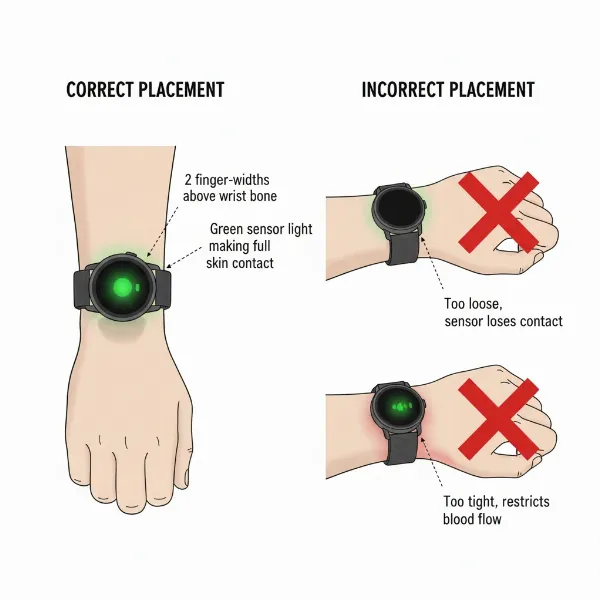 Illustration of correct and incorrect smartwatch placement for accurate heart rate monitoring.
Dirty Sensor or Skin Obstructions
The optical heart rate sensor uses LED lights and photodetectors to measure blood flow. Any obstruction on the sensor itself or on your skin can interfere with this process. Dirt, dust, sweat, lotions, or even lingering moisture can build up on the sensor’s underside, creating a barrier. Similarly, tattoos, scars, or excessive hair in the area where the watch sits can block the light signals, making it difficult for the sensor to obtain a reading. Regular cleaning is vital for maintaining optimal performance.
Software Glitches and Outdated Firmware
Like any electronic device, smartwatches can experience software bugs or glitches that disrupt their functions. An outdated operating system or fitness app can lead to communication errors between the sensor and the watch’s processing unit, causing intermittent failures or complete shutdowns. Sometimes, a recent software update might introduce unforeseen compatibility issues that affect sensor performance.
Environmental Factors and Movement Artifacts
Environmental conditions play a significant role in sensor accuracy. In cold weather, blood flow to your extremities decreases, which can make it harder for the optical sensor to get a clear reading. Intense physical activity involving rapid or irregular arm movements can also confuse the sensor, leading to what’s known as “cadence lock,” where the watch misinterprets the rhythm of your movement for your heart rate. Even bright sunlight can sometimes interfere with the sensor’s light-based measurements.
Low Battery and Conflicting Apps
A smartwatch running on a critically low battery might prioritize essential functions, temporarily disabling advanced features like continuous heart rate monitoring to conserve power. Additionally, having multiple fitness or heart rate tracking applications running simultaneously on your watch or paired smartphone can sometimes create conflicts, preventing any single app from reliably accessing the heart rate data. Ensure your watch has sufficient charge and manage your app permissions effectively.
Initial Checks and Quick Fixes
Before diving into more complex solutions, several simple steps can often resolve common heart rate sensor problems. These initial checks address the most frequent causes of sensor malfunction and are quick to implement.
Clean the Sensor and Your Wrist
Start by thoroughly cleaning the heart rate sensor on the back of your smartwatch. Use a soft, lint-free cloth, slightly dampened with water, to gently wipe away any dirt, sweat, or lotion residue. For stubborn grime, a mild soap solution can be used, followed by a rinse and complete drying. Also, ensure the skin on your wrist is clean and dry. This step alone often restores sensor functionality by removing physical obstructions.
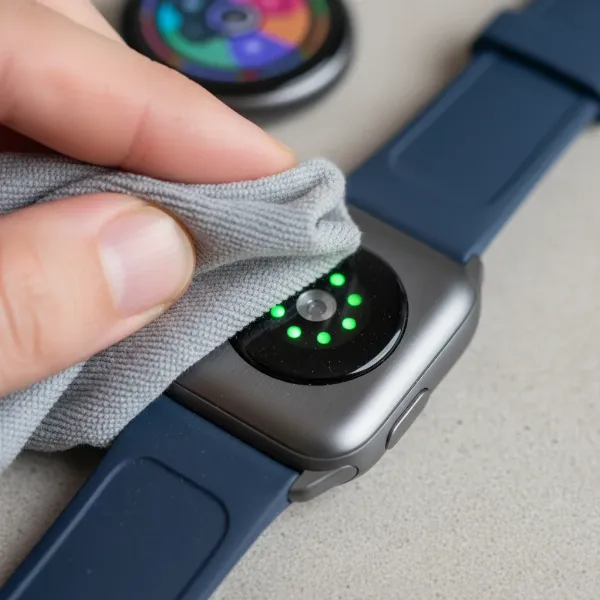 Person using a soft cloth to clean the optical heart rate sensor on a smartwatch.
Adjust Watch Fit and Position
Ensure your smartwatch is worn correctly. It should be snug on your wrist, but not uncomfortably tight, allowing it to maintain continuous skin contact without restricting blood flow. Try wearing the watch slightly higher on your forearm, away from the prominent wrist bone. This position often provides a better signal for optical sensors. Experiment with different tightness levels to find the sweet spot where the watch feels secure and the sensor can perform optimally.
Reboot Your Smartwatch
A simple restart can often clear temporary software glitches. Power off your smartwatch completely, wait for about 30 seconds, and then power it back on. This process can refresh the system, re-establish sensor connections, and resolve minor software hang-ups that might be preventing accurate heart rate detection. For many issues, a quick reboot is surprisingly effective.
Check Battery Level and Charging
Ensure your smartwatch has ample battery life. If your device is running low on power, some features, including continuous heart rate monitoring, might be temporarily disabled or perform inconsistently to conserve energy. Charge your watch fully and then re-test the heart rate sensor. A fully charged device ensures all features operate at their intended capacity.
Update Software and Apps
Outdated software is a common source of bugs and performance issues. Check for and install any available software updates for your smartwatch, as well as its companion app on your smartphone. Manufacturers frequently release updates that include bug fixes, performance enhancements, and improved sensor algorithms. Keeping your device’s software current can prevent many heart rate sensor problems.
Advanced Troubleshooting Steps
If the basic fixes haven’t resolved the issue, it’s time to delve into more in-depth troubleshooting. These steps address underlying software configurations or potential conflicts that might be affecting your heart rate sensor.
Review Heart Rate Settings
Your smartwatch likely offers various settings for heart rate monitoring, such as “continuous,” “manual,” or “at intervals.” Navigate to the health or heart rate settings within your watch or its connected app. If it’s set to manual, switch it to continuous or automatic monitoring to see if the sensor activates. If it’s already on continuous, try toggling it off and then back on, or even switching to manual for a test reading. Ensure any power-saving modes that might restrict sensor activity are disabled.
Address Cadence Lock During Workouts
Cadence lock occurs when the smartwatch’s sensor mistakenly reads your arm or leg movement rhythm as your heart rate, often during activities like running or cycling. To combat this, ensure your watch is worn very snugly and slightly higher on your arm during exercise. Warming up properly can also improve blood flow to the wrist. If the problem persists during specific activities, consider using an external chest strap heart rate monitor, which typically offers superior accuracy for high-intensity or irregular movements.
Manage Conflicting Applications
Multiple applications attempting to access the heart rate sensor simultaneously can create conflicts and prevent accurate readings. Review the apps installed on your smartwatch and smartphone that have permission to read heart rate data. If you have several, try disabling or uninstalling all but one, then test the sensor. This helps identify if a third-party app is interfering with the watch’s native heart rate functionality. Reinstall apps one by one to pinpoint the culprit if necessary.
Factory Reset Your Smartwatch
As a last resort for software-related issues, a factory reset can often resolve persistent problems by returning the watch to its original, out-of-the-box state. Be aware that this will erase all data and settings from your watch, so back up any important information first. After the reset, set up your watch again and test the heart rate sensor before restoring any apps or settings. If the sensor works post-reset, it indicates a software or app-related issue that was resolved.
When to Seek Professional Help or Replace Your Device
Despite diligent troubleshooting, there are instances when a smartwatch heart rate sensor simply won’t cooperate. Knowing when to escalate the issue or consider a replacement can save you time and frustration.
Suspecting Hardware Damage
If your heart rate sensor remains unresponsive even after trying all software and wearing adjustments, the problem might be hardware-related. Physical damage, such as a cracked sensor, water intrusion (especially if the watch’s water resistance has been compromised), or a loose internal component, can cause a permanent malfunction. Sometimes, even a minor impact can dislodge the intricate components. Look for any visible signs of damage, like flickering lights or physical defects on the sensor module.
“While many smartwatch issues can be resolved with simple adjustments, persistent sensor failure after extensive troubleshooting often points to a hardware defect. Don’t hesitate to consult official support.” – Jane Doe, Lead Smartwatch Technician
Warranty and Repair Options
Before considering a new purchase, check your smartwatch’s warranty status. If the device is still under warranty, contact the manufacturer’s support team. They can provide specific troubleshooting steps, offer a repair, or facilitate a replacement if a manufacturing defect is confirmed. For out-of-warranty devices, inquire about professional repair services, though the cost might sometimes approach that of a new watch.
Considering a Replacement
If your smartwatch is out of warranty, and professional repair costs are prohibitive, or if the model is particularly old and no longer receiving software updates, it might be time to consider upgrading. Newer smartwatches often feature more advanced and reliable heart rate sensor technology, improved algorithms, and enhanced durability. Evaluate your needs and budget to determine if investing in a new device is the most practical solution.
Preventing Future Heart Rate Sensor Issues
Maintaining your smartwatch and adopting good wearing habits can significantly extend the life and accuracy of its heart rate sensor, helping you avoid future troubleshooting headaches.
Consistent Proper Wearing
Always ensure your smartwatch is worn correctly. Position it a few centimeters above your wrist bone, and fasten it snugly enough to prevent movement during activities, but not so tightly that it restricts circulation. A proper fit ensures constant contact between the optical sensor and your skin, allowing for accurate and consistent heart rate readings.
Regular Cleaning Routine
Make cleaning your smartwatch’s sensor a regular habit. After workouts or any activity that causes sweating, wipe down the sensor and the watch’s underside with a soft, damp cloth. Periodically, perform a more thorough cleaning with mild soap and water to remove any accumulated grime or residue. A clean sensor is a happy sensor.
Keeping Software Updated
Stay vigilant about software updates for both your smartwatch and its companion app. Enable automatic updates if available, or regularly check for new versions. These updates often contain critical bug fixes, performance improvements, and enhanced algorithms that contribute to better sensor accuracy and overall device stability.
Awareness During Exercise
Be mindful of how different types of exercise can affect heart rate readings. For activities involving intense or irregular arm movements, understand that wrist-based readings may have temporary inaccuracies. For highly precise heart rate data during demanding workouts, consider supplementing your smartwatch with a chest strap monitor.
Protecting Your Device
Protect your smartwatch from physical damage and extreme conditions. Avoid dropping it or exposing it to harsh chemicals. While many smartwatches are water-resistant, always adhere to the manufacturer’s guidelines regarding submersion and cleaning to prevent water intrusion that could damage internal components, including the heart rate sensor.
Conclusion
A malfunctioning smartwatch heart rate sensor can disrupt your health tracking, but with the right approach, many issues are easily resolved. By addressing common culprits like improper fit, dirty sensors, or software glitches through systematic troubleshooting, you can often restore your device’s functionality. Remember the importance of proper wearing, regular cleaning, and keeping your software updated to prevent future problems.
If, after trying these solutions, your sensor remains unresponsive, it may indicate a hardware issue requiring professional attention or suggesting it’s time for an upgrade. Don’t let a faulty sensor derail your fitness journey; empower yourself with these troubleshooting tips and keep moving towards your health goals! What steps will you take today to ensure your smartwatch provides the accurate heart rate data you need?
Frequently Asked Questions
Why is my smartwatch heart rate sensor not lighting up?
If your smartwatch heart rate sensor is not emitting its characteristic green light, it typically indicates a software malfunction, a critically low battery, or a setting preventing continuous measurement. Try restarting the watch, ensuring it’s charged, and checking your heart rate monitoring settings in the companion app.
Can tattoos interfere with heart rate sensors?
Yes, tattoos, particularly dark or dense ones, can significantly interfere with optical heart rate sensors. The pigments in the tattoo can absorb the LED light emitted by the sensor, preventing it from accurately detecting blood flow and leading to incorrect or no readings. Try wearing the watch on your other wrist or using a chest strap.
How tight should a smartwatch be for accurate heart rate readings?
Your smartwatch should be snug enough that it doesn’t move or slide during activity, but not so tight that it feels uncomfortable or restricts blood circulation. It should maintain constant contact with your skin without leaving deep indentations. A proper fit ensures the optical sensor has a clear path to measure blood flow.
My smartwatch heart rate is inaccurate during exercise, what can I do?
Inaccuracy during exercise is often due to movement artifacts or “cadence lock”. Ensure your watch is worn securely and slightly higher on your arm. For high-intensity or activities with irregular movements, a chest strap heart rate monitor often provides superior accuracy. Also, check for software updates.
Should I factory reset my smartwatch if the heart rate sensor isn’t working?
A factory reset is a powerful troubleshooting step for persistent software-related issues, as it reverts the watch to its default settings. However, it should be considered a last resort after trying all other solutions, as it will erase all your data. Back up your watch before proceeding with a factory reset.
What is “cadence lock” and how does it affect heart rate readings?
Cadence lock is a phenomenon where your smartwatch’s heart rate sensor mistakenly picks up the rhythm of your arm or leg movements during exercise instead of your actual pulse. This results in highly inaccurate, often inflated, heart rate readings. To minimize this, ensure a snug watch fit, proper placement, and consider a chest strap for intense activities.